Creating new users and assigning roles
There are two ways to add new users to your site: by enabling site registration or adding new users manually.
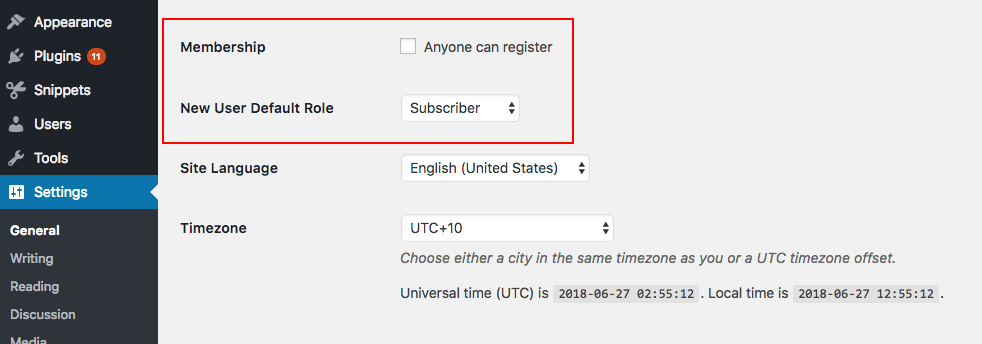
Enabling site registration is useful if you run a membership site and want to allow users to register to create their own account. You can enable this option by going to Settings > General and checking the option “Anyone can register.”
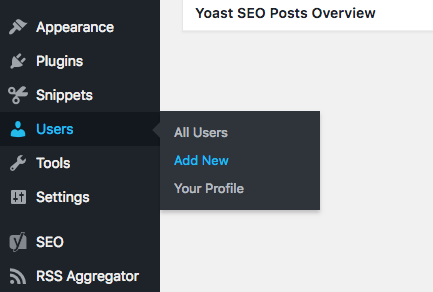
Alternatively, you can add a new user manually. To do this, go to Users > Add New.
A new screen will appear where you can fill in all the necessary details for the new users, including their name, email, and website. You can also choose to set their password, send a notification with details of their new account, and assign the user a role other than “subscriber.”
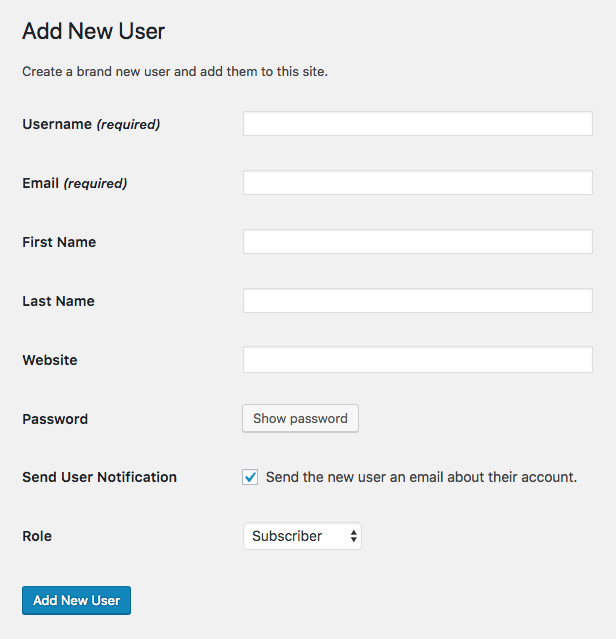
Once you click “Add New User,” the user will be added to your WordPress database and their details will appear under All Users.
In order to edit your user profile, simply go to Users > Your Profile where you can update your name, email, website, and author biographical info, as well as your profile picture and password, among other details.
If you have the admin or super admin role and want to modify another user’s profile information, go to Users > All Users and select the user you want to edit.
The case for custom user roles
Big brands such as Facebook, Microsoft, Wired and Quartz rely on WordPress to power some of their publications. So having appropriate user roles is crucial when assigning editors, authors and contributors to produce and manage content.
But while the default WordPress user roles have been designed to have capabilities that fit the requirements of modern websites, they don’t meet the needs of all websites.
One common example of why you might want to create custom roles is related to adding guest or staff writers to your blog.
If you want to add a new user to your blog to contribute content, then you might assign them the author or contributor role. However, by default authors have the ability to publish posts, which is a capability you might not want to give a new member of your team right off the bat. Users with this role can also edit and delete published posts.
With that in mind, you might think the contributor role would be a better option since it has more restricted access. However, contributors, while not being able to publish or edit existing content, can’t upload files to the media library, including images for their own posts.
So when assigning roles to new writers, this puts you in somewhat of a quandary: do you give them access to do their job with added permissions to make far-reaching changes to your published content, or play it safe with the result of not giving them enough access to complete their tasks, while potentially creating more work for others with access to the media library?
This is where being able to customize and create new user roles on your WordPress site becomes a useful ability to have. But since WordPress doesn’t provide options out-of-the-box for customizing user roles, you’ll need to use a plugin to modify user roles and permissions.
