WordPress Roles
WordPress comes with a user role management system that defines what a specific user can and cannot do on your website. Knowing these user roles and permissions is essential as your WordPress site grows. In this beginner’s guide to WordPress user roles, we will compare each WordPress user roles and permissions in an easy to follow infographic.
Out of the box when you install WordPress, there are five default user roles:
- Administrator
- Editor
- Author
- Contributor
- Subscriber
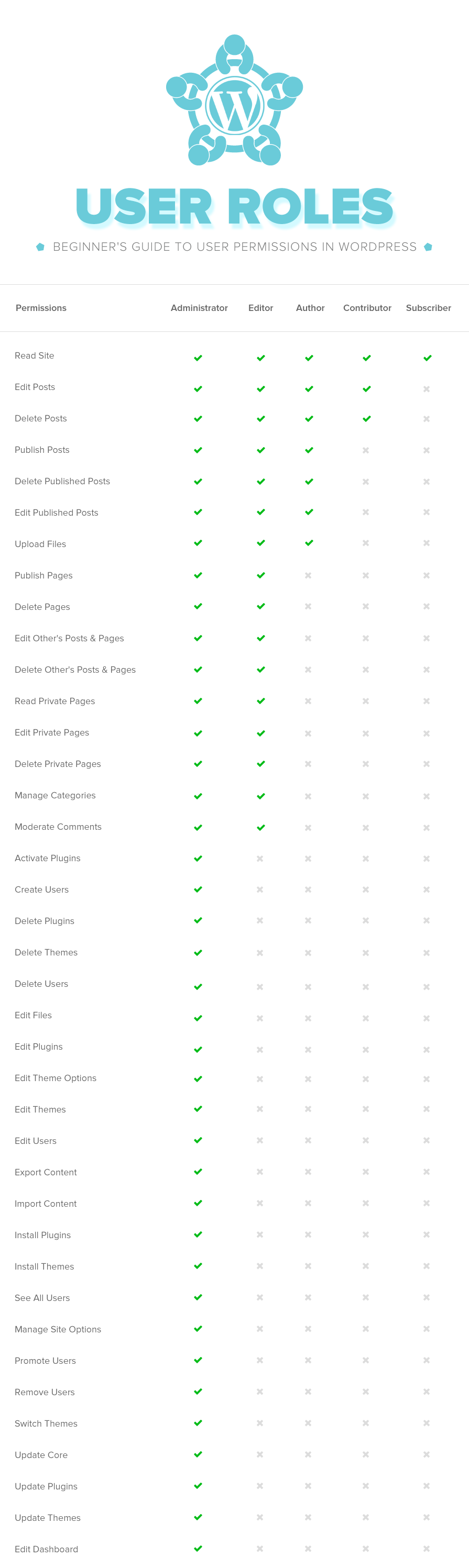
Let’s start by looking at each default user role and their permissions.
Administrator
On a regular WordPress install, the Administrator is the most powerful user role. Users with the administrator role can add new posts, edit any posts by any users on the site, and even delete those posts.
They can install, edit, and delete plugins as well as themes. Most importantly an administrator user can add new users to the site, change information about existing users including their passwords as well as delete any user (yes other administrators too).
This role is basically reserved for site owners and gives you full control of your WordPress site. If you are running a multi-user WordPress site, then you need to be very careful who you assign an administrator user role.
Editor
Users with the editor role in WordPress have full control of the content sections of your website. They can add, edit, publish, and delete any posts on a WordPress site including the ones written by others. An editor can moderate, edit, and delete comments as well.
Editors do not have access to change your site settings, install plugins and themes, or add new users.
Author
As the name suggests, users with the author role can write, edit, and publish their own posts. They can also delete their own posts, even if they are published.
When writing posts, authors cannot create categories however they can choose from existing categories. On the other hand, they can add tags to their posts
Authors can view comments even those that are pending review, but they cannot moderate, approve, or delete any comments.
They do not have access to settings, plugins, or themes, so it is a fairly low-risk user role on a site with the exception of their ability to delete their own posts once they’re published.
Contributor
Contributors can add new posts and edit their own posts, but they cannot publish any posts not even their own. When writing posts they can not create new categories and will have to choose from existing categories. However, they can add tags to their posts.
The biggest disadvantage of a contributor role is that they cannot upload files (meaning they can’t add images on their own article).
Contributors can view comments even those awaiting moderation. But they cannot approve or delete comments.
They do not have access to settings, plugins, or themes, so they cannot change any settings on your site.
Subscriber
Users with the subscriber user role can log in to your WordPress site and update their user profiles. They can change their passwords if they want to. They cannot write posts, view comments, or do anything else inside your WordPress admin area.
This user role is particularly useful if you require users to login before they can read a post or leave a comment.
